How do QR codes work? The squares explained
How a QR code stores data and how your phone reads it: finder patterns, versions 1 to 40, error correction levels L, M, Q and H, capacity and the quiet zone.
Add LearnQRCode as a preferred source on Google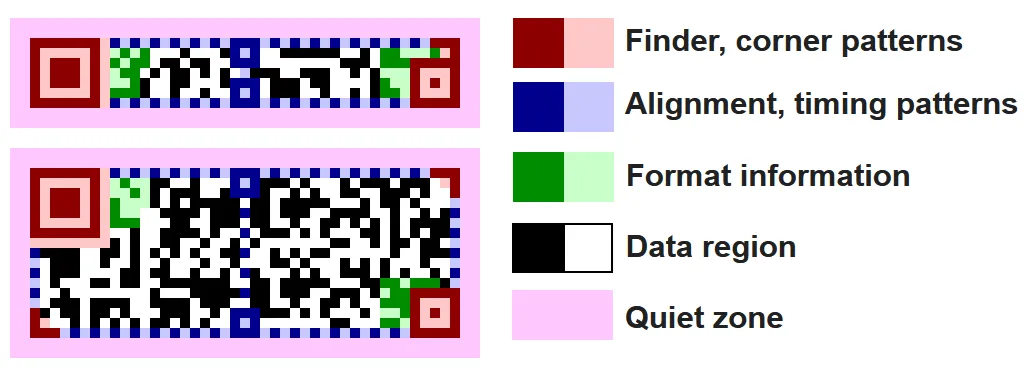
Quick answer
- A QR code stores data as a grid of dark and light squares (modules) that your phone decodes back into text.
- Three corner squares let the scanner find the code at any angle; codes come in 40 sizes, from 21 × 21 to 177 × 177 modules.
- Error correction lets a code be read with roughly 7% (level L) to 30% (level H) of it damaged.
At a glance
- 1Data becomes dark and light modules
- 2Three corner squares locate the codeRead at any angle
- 340 versions, 21 to 177 modules
- 4Error correction restores 7% to 30%
In this guide
Every square in a QR code has a job. Here’s what’s inside the pattern and what your phone does in the second between pointing and seeing a link.
The short version
- Data goes in. A generator turns text such as
https://example.cominto binary, adds error correction data and draws it as dark and light squares. - The camera sees a picture containing the code at some angle.
- Software finds the code via the three corner squares, works out size and rotation, and maps the grid.
- The pattern turns back into text: each square is read as 1 or 0, errors are fixed, the text is decoded.
- Your phone acts on it, for example offering to open a link or join Wi-Fi.
Decoding happens on your phone; no internet is needed until you open a link.
Modules: the building blocks
The small squares are modules; dark and light represent the two values of a bit. Module size depends on how big the code is printed, from a business card stamp to a building banner.
What are the three big squares for?
These position detection patterns (finder patterns) tell a scanner “there’s a code here, and this is its orientation.”
DENSO WAVE’s team surveyed flyers, magazines and boxes for the ratio of dark to light bands that appears least often in print: 1:1:3:1:1. A scanner sweeping any direction spots that ratio quickly, so the code reads at any angle through 360 degrees. One empty corner tells the scanner which way up it is.
The other fixed patterns
Per the ISO/IEC 18004 standard:
- Timing patterns: alternating dark and light lines between the finder patterns that let the scanner count rows and columns.
- Alignment patterns: smaller squares from version 2 upward that correct for curved or tilted surfaces.
- Format information: a strip beside the finder patterns recording the error correction level and mask.
- Version information: two small blocks in version 7 and above.
Everything else is data and error correction.
Versions: why some QR codes are bigger
There are 40 versions. Version 1 is 21 × 21 modules; each version adds 4 per side, up to 177 × 177 at version 40. The generator picks the version from the amount and type of data and the error correction level.
DENSO WAVE’s example: 100 digits at level M fit in version 3 (29 × 29). A long web address with tracking parameters makes a denser code with smaller modules, harder to scan when printed small. See QR code size.
How much data fits?
Maximums at version 40, lowest error correction:
| Data type | Maximum |
|---|---|
| Numeric (0–9) | 7,089 characters |
| Alphanumeric (0–9, A–Z and a few symbols) | 4,296 characters |
| Binary (8-bit bytes) | 2,953 characters |
| Kanji | 1,817 characters |
A single code can mix these modes. Numbers pack tightest; web addresses usually use binary (byte) mode.
Error correction: why a damaged code still works
Every code carries extra Reed-Solomon error correction data, the same family of techniques used on CDs, to rebuild scratched, smudged or covered parts. DENSO WAVE’s four levels are:
| Level | Data that can be restored | Typical use |
|---|---|---|
| L | About 7% | Clean environments, lots of data |
| M | About 15% | The most commonly chosen level |
| Q | About 25% | Dirty or rough environments |
| H | About 30% | Harsh conditions, or codes with a logo on top |
Higher levels need a bigger version for the same data. That’s why codes with a logo in the middle use a higher level: the logo covers modules and error correction fills the gap, up to a point. See QR code colours and design.
Masking: keeping the pattern readable
Some data would create blank areas or shapes resembling a finder pattern. The generator applies one of eight masks that flip modules, keeps the easiest to read, and records it in the format information.
The quiet zone
DENSO WAVE specifies an empty margin, the quiet zone, four modules wide on every side. Without it, nearby text or graphics get mistaken for the pattern. Cropping it is a common reason a printed code won’t scan.
Putting it together
Your phone finds the corner squares, lays a grid using the timing and alignment patterns, reads the format information, removes the mask, reads and repairs the data, and decodes the text, usually in a fraction of a second.
Where the design came from: who invented the QR code. The basics in brief: what a QR code is.
Frequently asked questions
- How does a phone read a QR code?
- The camera captures an image, software looks for the three corner squares to find the code and its angle, maps the grid of modules, reads the format information, corrects any errors and turns the bits back into text, such as a web address.
- Does a QR code need the internet to work?
- No. The data is stored in the pattern itself and is decoded on your phone without a connection. You only need the internet if the data is a web address you then want to open.
- What are the three squares on a QR code?
- They are position detection patterns, often called finder patterns. Their black and white bands follow a 1:1:3:1:1 ratio that DENSO WAVE chose because it rarely appears in printed material, so scanners can find the code quickly.
- Can a damaged QR code still be scanned?
- Often, yes. Every QR code includes error correction data. Depending on the level chosen when it was made, roughly 7%, 15%, 25% or 30% of the codewords can be restored, but damage to the corner squares can still stop it scanning.
Sources
- Information capacity and versions of the QR Code, DENSO WAVE (QRcode.com)
- Error correction feature, DENSO WAVE (QRcode.com)
- QR Code Standardization and outline specification, DENSO WAVE (QRcode.com)
- Point for determining the code area (quiet zone), DENSO WAVE (QRcode.com)
- History of QR Code, DENSO WAVE (QRcode.com)
- ISO/IEC 18004:2024, QR code bar code symbology specification, ISO